Project Ascend

Let’s design your personalized Full-Stack Cloud Roadmap focused on minimal cost, high learning impact, and real-world employer value — using your C# / .NET background and expanding it toward modern cloud deployment.
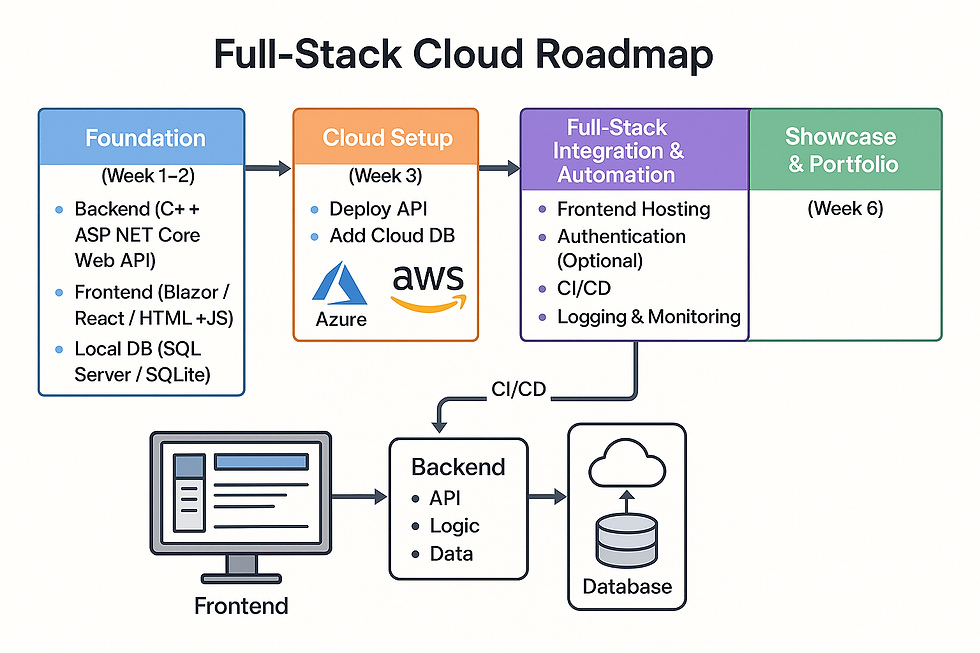
🧭 Overview: Goal
Build, deploy, and present a professional full-stack web app that runs fully online — backend, database, and frontend — using Azure or AWS free tiers.
🏗️ PHASE 1 — Foundation (Week 1-2)
Goal: Strengthen your backend & frontend fundamentals.
✅ Tasks
Backend (C# + ASP.NET Core Web API):
Convert your BankSystem logic into REST endpoints (/accounts, /transactions, /customers).
Add models, controllers, DTOs, and simple input validation.
Frontend (HTML + JavaScript / Blazor / React):
Build a clean UI that can call your API (GET / POST).
Example pages: Home, Accounts, Transactions, About.
Local DB:
Use SQL Server Express or SQLite.
Practice migrations with Entity Framework Core.
🧠 Learn
HTTP methods & JSON
CRUD operations
REST API design
☁️ PHASE 2 — Cloud Setup (Week 3)
Goal: Learn cloud console basics and deploy a simple app.
🟦 Option A – Azure (Recommended for C#)
Create a free Azure Student Account.
Deploy your API via App Service → Deploy from Visual Studio.
Connect to Azure SQL Database (free tier).
🟨 Option B – AWS (for broader exposure)
Use Elastic Beanstalk or AWS Lambda + API Gateway.
Store data in AWS RDS (free tier).
🧠 Learn
Environment Variables (secrets & connection strings)
Cloud Resource Structure (Resource Group / Region)
Deployment Logs & Monitoring
🧩 PHASE 3 — Full-Stack Integration & Automation (Week 4-5)
Goal: Make your entire system cloud-based and connected.
✅ Tasks
Frontend Hosting
Use GitHub Pages, Netlify, or Vercel (free).
Configure your frontend to call your cloud API URL.
Authentication (Optional but Impressive)
Azure Active Directory (Entra ID) or AWS Cognito for login.
CI/CD
Use GitHub Actions or Azure DevOps Pipelines to deploy automatically on git push.
Logging & Monitoring
Azure Application Insights or AWS CloudWatch.
🧠 Learn
CI/CD concepts
API security & tokens (JWT)
CORS configuration
🌐 PHASE 4 — Showcase & Portfolio (Week 6)
Goal: Make it look professional and “hire-ready”.
✅ Deliverables
💬 Add to Portfolio
“Deployed a C# ASP.NET Core BankSystem Web App with Azure SQL and CI/CD integration, demonstrating end-to-end full-stack and cloud deployment skills.”
🧰 Suggested Tech Stack Summary
Layer | Tool | Purpose |
Frontend | Blazor / React / HTML + JS | UI & interaction |
Backend | ASP.NET Core Web API | Business logic + data endpoints |
Database | Azure SQL / AWS RDS | Persistent storage |
Deployment | Azure App Service / AWS Elastic Beanstalk | Cloud hosting |
CI/CD | GitHub Actions / Azure DevOps | Auto deployment |
Auth (Optional) | Azure AD / AWS Cognito | Secure login |
💰 Keep It Free
Platform | Free Quota |
Azure Student | $100 credit + 12 months free |
AWS Free Tier | 12 months on most services |
GitHub Pages / Netlify | Free forever |
Renee Li is fully in charge of this project and aiming at finishing this project before December 2025.
This project isn’t just about building software — it’s about learning through doing. It’s meant to give students like Rococo and other self-learners the opportunity to:
Understand each layer of a real-world web system
Practice deploying applications in a cloud environment
Build confidence in professional workflows used by modern developers
By open-sourcing this project, RococoMakes hopes to inspire and support more learners to bridge the gap between academic theory and industry practice.
Please join us in welcoming Renee Li to the RococoMakes journey! Together, we’re building the bridge between learning and real-world experience — one stack at a time.

Comments